New Features in Copilot for Windows 11 and 10
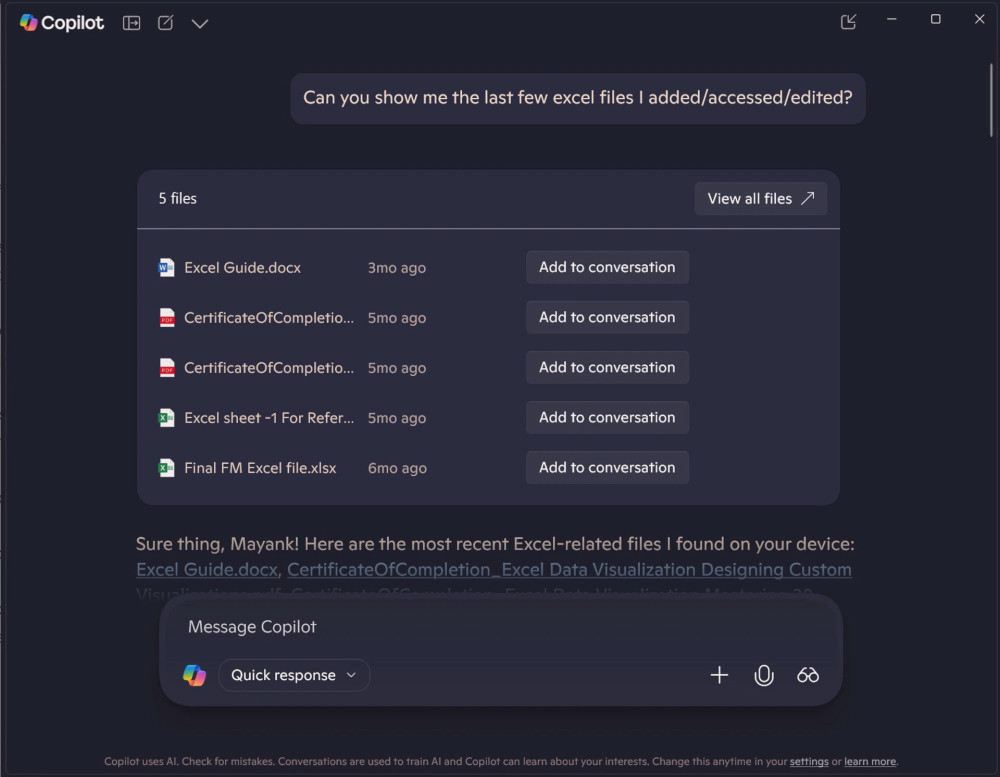
Microsoft has started rolling out a long-awaited feature in Copilot for Windows 11 and 10, enabling the AI assistant to search for files stored locally or synchronized via OneDrive. Previously, this feature was only available to Windows Insider participants, but now it is accessible to all Copilot users, according to Windows Latest.
The "File Search" feature in Copilot leverages Windows Search indexing, allowing users to locate documents by name, type, or date. It supports various formats including Microsoft Office (DOCX, XLSX, PPTX), PDF, text files, and more. However, specific developer extensions, such as .dart, are currently not searchable.
By default, Copilot only has access to the "Documents" and "Downloads" folders, but users can customize the search area in the Windows permission settings. To activate the feature, users need to enable it in the Copilot settings. Microsoft has intentionally left it deactivated by default for privacy reasons.
Microsoft reports that the feature will be rolled out gradually over the coming weeks and does not require a Copilot Pro subscription. The company views local file search as a natural extension of Copilot's integration into the desktop environment, helping users quickly find and interact with documents without leaving the chat interface.